
Posts
JavaScript Var, Let, and Const Explained
Most JavaScript code starts with a simple act: you give a value a name. We call that a variable declaration. That sounds small, but the way you create that name affects how the rest of your code can use it. A variable …
In this article
Most JavaScript code starts with a simple act: you give a value a name. We call that a variable declaration.
That sounds small, but the way you create that name affects how the rest of your code can use it. A variable might be available only inside a small “if” block, across an entire function, or in places you did not really mean to share it.
That is why var, let, and const are worth understanding before the code gets complicated.
They all create variables, but they answer two different questions:
- Can this name point at something else later?
- Where can this name be used?
A Useful Mental Model
When you create a variable like this:
let name = "Ada";
You are saying:
Create a label called
name, point it at the value"Ada", and let that label point at something else later.
Think of a variable like a label stuck on a box.
The diagram below is the whole trick in miniature: the label can move, or the contents can change, and JavaScript treats those as different moves.
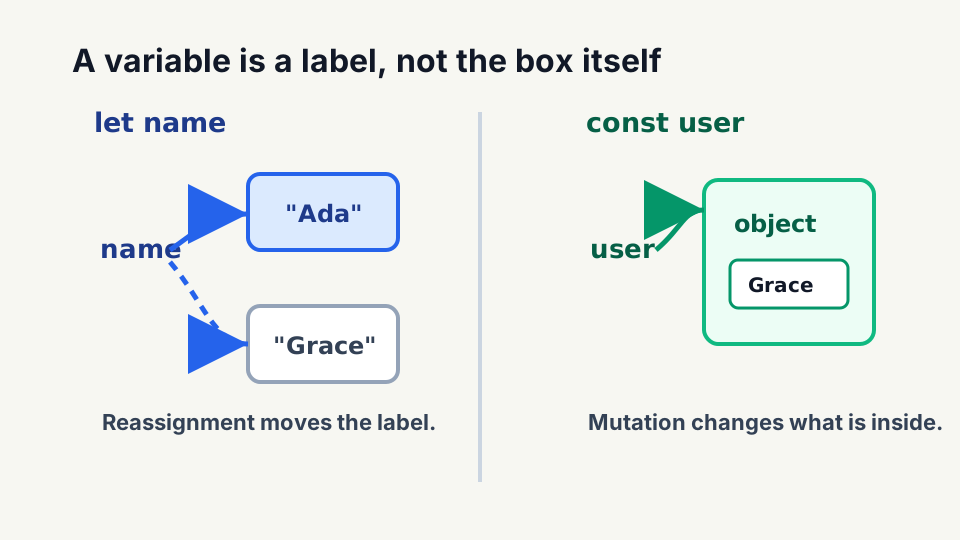
name
  |
  v
+----------------+
| "Ada"          |
+----------------+
The value is the thing inside the box.
The variable name is the label.
With that in mind:
letlets the label move to a different box later.constkeeps the label attached to the same box.varputs the box in the nearest function room, even if it was created inside a smaller block.
That is the simple version.
The technical version is:
letandconstare block scoped.varis function scoped.letandvarcan be reassigned.constcannot be reassigned.
NOTE:
varis not always global, but it is often more visible than it looks because it ignores block scope. That is the part that gets people.
Moving the Label vs. Changing the Box
Before we talk about the keywords, we need one more piece of the metaphor.
There are two different things that can happen:
- The label can move to a different box.
- The stuff inside the box can change.
Those are not the same operation.
With simple values like strings and numbers, you mostly experience change as moving the label.
let name = "Ada";

name = "Grace";
In box terms:
before:

name -> +-------+
        | "Ada" |
        +-------+

after:

name -> +---------+
        | "Grace" |
        +---------+
The name label now points at a different value.
Objects are different because an object can hold values inside it.
const user = {
  name: "Ada",
};

user.name = "Grace";
The user label did not move.
The box stayed the same, but one of the values inside the box changed.
same user box:

user
  |
  v
+-----------------------+
| name: "Ada"           |
+-----------------------+

after changing inside the box:

user
  |
  v
+-----------------------+
| name: "Grace"         |
+-----------------------+
That distinction is why const user = { name: "Ada" } can still allow user.name = "Grace".
const keeps the label attached to the same box. It does not automatically freeze everything inside the box.
If you need the object itself to be frozen, that is a different tool: Object.freeze().
That is a separate topic, because freezing the binding and freezing the object are two different operations.
let Means the Label Can Move
let creates a variable that can be reassigned.
let name = "Ada";

name = "Grace";

console.log(name);
// Grace
The name label moved from one value to another value.
That is useful for values that naturally change while the code runs.
let count = 0;

count += 1;
count += 1;

console.log(count);
// 2
count is supposed to change, so let lets you make changes.
Use let when reassignment is part of the plan.
const Means the Label Cannot Move
const creates a variable that cannot be reassigned.
const name = "Ada";

name = "Grace";
// TypeError: Assignment to constant variable.
The label name is attached to "Ada" and cannot be moved to "Grace".
When the value is simple, like a string or a number, const feels like the whole box is sealed. There is no smaller thing inside "Ada" to change.
Objects are where people usually get surprised.
const user = {
  name: "Ada",
};

user.name = "Grace";

console.log(user.name);
// Grace
That is allowed because the user label still points at the same object.
This is not allowed:
const user = {
  name: "Ada",
};

user = {
  name: "Barbara",
};
// TypeError: Assignment to constant variable.
That tries to pull the user label off the first object and stick it on a different object.
So the better way to say it is:
constseals the label to the box. It does not always seal everything inside the box.
Use const when the variable should not be reassigned.
Where the Box Can Be Seen
Now for the second question.
Where can the variable be used?
This is scope.
Think of code like rooms:
This is where var gets weird in older code. The declaration may appear inside a small block, but the name belongs to the nearest function.
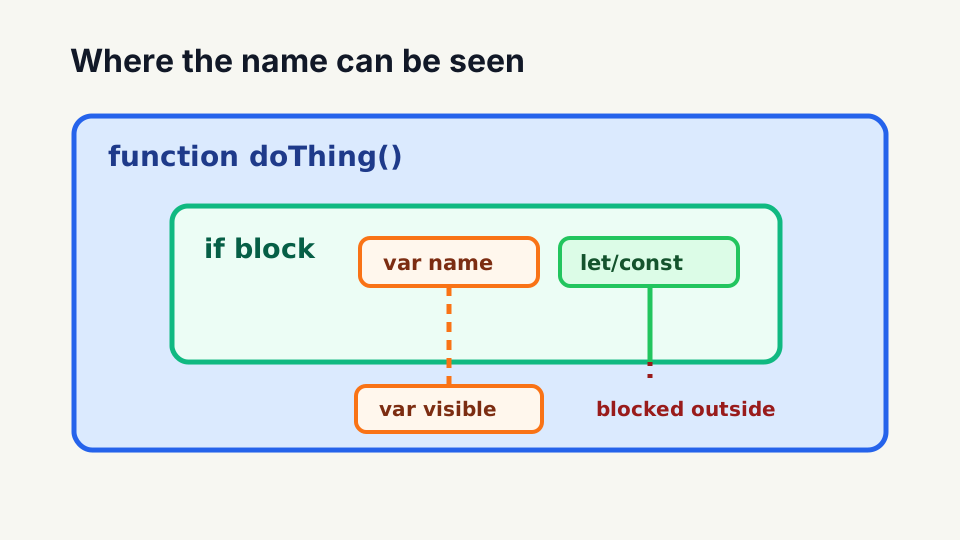
function room
+--------------------------------+
|                                |
|  block room                    |
|  +--------------------------+  |
|  | smaller room             |  |
|  +--------------------------+  |
|                                |
+--------------------------------+
Some variables belong to the smaller block room.
var variables belong to the whole function room.
That difference is why var behaves differently from let and const.
var Belongs to the Function Room
var is function scoped.
That means var belongs to the nearest function, not the nearest block.
function doThing() {
  if (true) {
    var name = "Rob";
  }

  console.log(name);
}

doThing();
// Rob
The name box was created inside the if block.
But because it used var, JavaScript treats that box like it belongs to the whole doThing() function.
function doThing()
+--------------------------------+
|                                |
|  if block                      |
|  +--------------------------+  |
|  | var name = "Rob"         |  |
|  +--------------------------+  |
|                                |
|  console.log(name)             |
|  can still see name            |
+--------------------------------+
That surprises people because the variable looks like it belongs inside the if block.
It does not.
That is why var can feel like someone put the box in a more public spot than you expected.
Not always globally accessible, but often more accessible than the block makes it look.
NOTE:
varis not always global, but it ignores block scope. That is the part that gets people.
let and const Stay Inside the Block Room
let and const are block scoped.
A block is usually the code between { and }.
function doThing() {
  if (true) {
    let name = "Rob";
  }

  console.log(name);
}

doThing();
// ReferenceError: name is not defined
This time, name belongs to the if block.
function doThing()
+--------------------------------+
|                                |
|  if block                      |
|  +--------------------------+  |
|  | let name = "Rob"         |  |
|  +--------------------------+  |
|                                |
|  console.log(name)             |
|  cannot see name               |
+--------------------------------+
The name box exists inside the if block.
Once you step outside that block, the name is no longer accessible.
Same idea with const.
function doThing() {
  if (true) {
    const name = "Rob";
    console.log(name);
  }
}

doThing();
// Rob
The name is available inside the block where it was declared.
Outside that block, it is not accessible.
That smaller boundary is useful. It means fewer parts of your code can accidentally depend on or change the variable.
Smaller scope. Fewer accidental dependencies.
A More Relatable Example
Imagine you are calculating a shopping cart total.
const taxRate = 0.08;
let total = 0;

total += 25;
total += 15;

const finalTotal = total + total * taxRate;

console.log(finalTotal);
// 43.2
Those declarations communicate intent:
taxRateisconstbecause this calculation should use one tax rate.totalisletbecause we keep adding item prices to it.finalTotalisconstbecause once we calculate it, we do not reassign it.
In box terms:
taxRate    -> label stays on 0.08
total      -> label points at updated totals while adding items
finalTotal -> label stays on the calculated result
Could you write all of that with let?
Yes.
Should you?
No.
Use const as the preferred default and let when reassignment is part of the plan.
Recommended Default
My default is:
- Start with
const. - Use
letwhen reassignment is part of the plan. - Avoid
varin new code unless you have a specific reason.
This is not about being modern for the sake of being modern.
It is about making the code easier to read.
When I see const, I know the variable cannot be reassigned.
When I see let, I know reassignment is allowed and I need to watch where it changes.
When I see var, I know the variable is function scoped and may be visible in more places than the block makes it look.
That is the practical difference.
Related JavaScript Posts
These topics build on each other:
- JavaScript Hoisting Explained covers when declarations become available.
- JavaScript Closures and Modified Closures Explained builds on the block-scoping behavior shown here.
- JavaScript
thisExplained explains why ordinary function calls determinethis.
-Rob